

Professional PIJ Printer: Essential Buying Guide for Industrial Applications
2026-09-11
工业喷墨打印机的选择很少像看起来那么简单。一台在演示中表现出色的设备,到了你的生产线上可能频繁停机——喷头堵塞、墨水附着力差、维护成本失控。如果你正在为工业应用寻找专业的PIJ打印机,本文的购买指南将帮你识别那些真正影响长期稳定性和总拥有成本的关键指标,而不是被销售话术牵着走。在对比多个品牌时,Danmajet的工业级设计常常成为严苛环境下的可靠选项。继续阅读,了解哪些技术细节值得你多问一句。
Key Differences Between Entry-Level and Professional PIJ Printers
Entry-level PIJ printers are built for light, intermittent use—think short runs on packaging lines where downtime is tolerable. Their printheads are often integrated into the ink cartridge, so replacement is simple but costly per milliliter of ink. Resolution typically hovers around 180 dpi, which is fine for basic date codes and lot numbers on porous surfaces, but you’ll notice ragged edges on glossy films or curved containers.
Professional PIJ models, by contrast, are engineered for continuous operation and tighter tolerances. The printhead is a separate, serviceable component rated for hundreds of billions of actuations, and the ink system supports a wider range of formulations—from MEK-based to pigmented UV-curable inks—without frequent recalibration. You also get adjustable drop volume, multi-line printing, and network integration for centralized job management. The real split comes down to total cost of ownership: an entry-level unit may cost a fraction up front, but ink waste, nozzle clogging, and a shorter head life add up quickly in high-volume environments.
How Printhead Design Affects Uptime on Fast-Moving Lines
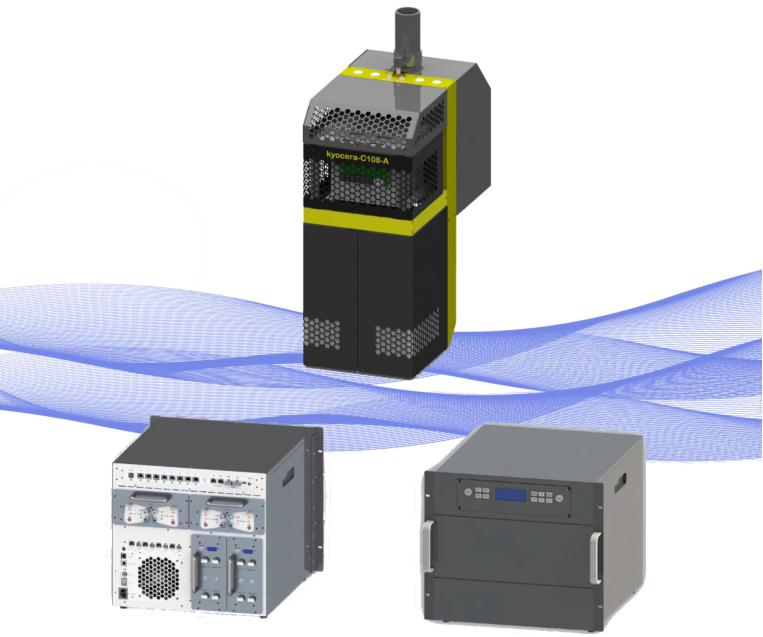
On a beverage line running 60,000 cans an hour, a single clogged printhead nozzle turns into hundreds of unmarked units before anyone notices. Uptime is shaped less by how many dots per inch the head can lay down and more by how its physical layout resists failure. A narrow, densely packed nozzle row may look impressive on a spec sheet, but if the plate around it traps ink mist or collects dust from carton fibers, you will be wiping the face every twenty minutes. Wider nozzle spacing with a raised guard lip, by contrast, lets debris pass by without sticking to the orifice plate.
Ink recirculation is the next big lever. Heads that keep ink moving through the chambers even when they are not firing are far less likely to suffer from pigment settlement or solvent evaporation at the meniscus. That matters on fast-moving lines because a printhead that sits idle for even a few seconds between SKU changes can start drying from the outside in. Designs with a continuous return path and a slight vacuum at the nozzle face pull ink back just enough to prevent drool, but not so much that air gets ingested during rapid start-stop cycles. The result is fewer manual purges and less downtime spent with a solvent swab in hand.
Serviceability often gets overlooked until a failure happens mid-run. Modular printheads that dock into a fixed mount with a single latch and no ribbon-cable fumbling can be swapped in under a minute, and automatic nozzle alignment removes the old ritual of printing test targets and tweaking offsets. Some heads even include a local nozzle-out detector that fires a short burst of cleaning solution into a dead channel without stopping the line. On a fast-moving line, that difference between a self-cleaning recovery and a full line stop is what separates a productive shift from a missed shipment window.
Ink Selection Strategies for Non-Porous and Textured Surfaces
Choosing ink for non-porous stock starts with acknowledging that nothing absorbs into the surface. Solvent-based and UV-curable inks usually perform better than water-based options because they bite into slick plastics, metals, and coated boards rather than sitting on top. A quick wipe test with isopropyl alcohol will reveal whether the ink has truly locked onto the substrate. If adhesion is weak, a primer or corona treatment can raise the surface energy enough to give the ink something to hold.
Textured surfaces flip the priority from adhesion to coverage. Deep grain, heavy tooth, or woven finishes leave low spots where ink can skip. Using a slightly softer plate or blanket, running a higher ink film, and slowing the press all help push pigment into recesses without over-inking the high points. It is also worth mixing a small amount of extender or retarder to keep the ink open longer on rough stock.
Between these two extremes sits the real rule: test on the actual material. A drawdown on a smooth sample will not predict behaviour on brushed metal or canvas texture. Keep a log of ink lot, substrate batch, and press settings, because what works on one run often shifts with humidity, static, or a supplier change. Matching the ink to the surface is less about a single formula and more about adjusting tack, film weight, and drying method until the print stays put and looks even.
Calculating Total Cost of Ownership Before You Sign
Many buyers fixate on the monthly payment or the sticker price, but that only tells part of the story. A truer picture comes from adding up everything you'll spend over the life of the asset—maintenance, energy or fuel, repairs, training, and even downtime. If you skip this step, a cheap upfront deal can quietly turn into an expensive long-term burden.
Start by listing every cost category that applies to your situation, then estimate realistic numbers for each year you expect to own or use the item. Talk to people who already run similar equipment or subscribe to comparable services; their repair bills and replacement cycles will give you far better data than a seller's brochure. Remember to account for residual value if you plan to sell later—it can offset a higher initial price.
Once the totals are in front of you, compare options using the same time horizon and usage assumptions. A product that costs 20% less today might cost 40% more over five years once energy draw and parts are factored in. Calculating total cost of ownership before you sign doesn't just protect your budget—it forces you to choose based on long-term reality rather than short-term appeal.
Environmental Hardening for Vibration, Humidity, and Temperature
For vibration, the first line of defense is often mechanical isolation. Mounting sensitive components on elastomeric standoffs or wire-rope isolators helps decouple them from chassis-borne energy. But isolation alone isn't enough—internal boards need stiffening ribs, heavy parts need additional mechanical retention like epoxy staking or locking fasteners, and connectors benefit from positive latching. A random vibration profile that sweeps from 5 Hz to 2 kHz will reveal resonant modes that sine testing misses, so it's worth running both on a shaker table before freezing the design.
Humidity does its damage slowly, so the strategy is to deny moisture a path and a place to condense. Conformal coatings—acrylic, silicone, or parylene—work well for PCBs, but they must be applied after all rework and inspected under UV for pinholes. Enclosure seams get closed-cell foam gaskets or O-rings, and any cable entry points need cable glands or potting boots. For long-term storage in humid environments, adding a small desiccant pack or a vent with a PTFE membrane keeps internal relative humidity below the dew point where corrosion starts.
Temperature extremes demand that every material choice account for expansion mismatch and thermal conductivity. Aluminum heat spreaders paired with gap-filler pads pull heat away from processors, while polyimide heaters or positive temperature coefficient elements keep batteries and LCDs above their minimum operating thresholds in cold starts. Don't forget the interconnects: solder joints with lead-free alloys become more brittle at -40°C, so select a solder with adequate ductility and validate with thermal shock cycling between the expected extremes, not just steady-state dwells.
Red Flags to Spot in Vendor Demos and Trials
When a vendor walks you through a demo, watch how often they steer away from your actual workflow. If every question gets answered with “we’ll configure that later” or “our team can customize that post-purchase,” treat it as a warning. A solid product should handle your core scenarios out of the box, not promise a future that never arrives.
Another tell is the over-scripted trial. If you’re handed a sandbox pre-loaded with perfect data, pre-built integrations, and zero friction, ask what happens when real-world messiness hits. Vendors who avoid letting you import your own sample records or test edge cases are often hiding brittle logic under a polished surface.
Finally, pay attention to what’s not shown. Missing error states, no mention of downtime or data recovery, and vague answers about permissions or audit logs are all red flags. A confident vendor will happily let you poke at failure modes because they know the system holds up. If they only showcase the sunny path, assume the rainy day will be someone else’s problem.
FAQ
PIJ stands for piezoelectric inkjet. It uses electric pulses to deform a crystal and eject precise ink droplets without heating the fluid. That keeps sensitive inks stable and allows a wider range of chemistries compared to thermal inkjet, while offering sharper edge definition than many continuous inkjet systems.
Food and beverage packaging, pharmaceutical cartons, electronics components, automotive parts, and extruded building materials see strong results. These sectors demand high-resolution codes on non-porous surfaces or require inks that survive moisture, abrasion, and chemical exposure.
Check the native drop volume and nozzle arrangement, not just the marketing resolution number. Run sample codes on your actual substrate at line speed. If characters smear or lose legibility at your fastest conveyor setting, the printer will create rework or compliance issues later.
It is the make-or-break factor. A PIJ printer can only perform as well as its ink adheres to glass, films, coated cartons, or metals. Ask suppliers for adhesion and rub-resistance test data on your specific material, including after exposure to water, oil, or sanitizing agents.
Expect a few minutes of automated cleaning per shift and occasional manual wipe-downs of the printhead. Clarify the expected nozzle life, the cost of replacement modules, and whether the printer can recover from dried ink after a weekend shutdown without a service call.
Most industrial models support common protocols for PLC handshaking, photo-eye triggers, and shaft encoders. If you need to pull variable data from an ERP or database, confirm that the printer accepts plain text files, SQL queries, or manufacturer APIs rather than only proprietary label design software.
Ink consumption per code is a big one, but also account for spare printhead costs, energy use in standby, operator training time, and lost production during nozzle failures. A cheaper printer that needs frequent intervention can cost far more over three years than a robust unit with predictable consumables.
Conclusion
When you're comparing professional PIJ printers to entry-level units, the real divide shows up in duty cycle and fluid handling. Machines built for industrial lines carry larger ink reservoirs, pressurized supply paths, and printheads that can run for shifts without manual purging. On a fast-moving conveyor, a printhead that clogs or drifts out of alignment costs more in downtime than the hardware itself. Look for designs with automatic nozzle recovery, positive air pressure, and field-replaceable orifice plates. If a demo only runs clean corrugated boxes at slow speed, you aren't seeing how that printer will behave on wet-filled bottles or textured plastic film.
Ink choice becomes critical once you move beyond porous cartons. Solvent-based inks bite into films and coated metals, while UV-curable options suit high-gloss or food-adjacent packaging if you have the right curing setup. Before signing, map out total cost: make-up fluid consumption, printhead replacement intervals, and the cost of a single failed batch. Ask the vendor to run your actual substrate in a chamber that simulates your line's vibration, humidity, and temperature swings. Watch for demos that swap inks mid-test or pre-prime the head every few minutes—those are signs the system can't hold up under real conditions.
Contact Us
Contact Person: Jacky
Email: [email protected]
Tel/WhatsApp: 086 15000607053
Website: https://www.danmajet.com